How to use Jev in a voice agent: 10 production patterns
Use Jev, TypeSafe's typed decision model, for understanding, and keep writing separate. At taritas, each turn of a voice agent runs in three steps. First, one Jev request carries every question the turn needs, such as safety risk, intent, topic, agreement and step completion, and returns a probability for each in 0.35 to 0.5 s, whether it holds 5 questions or 60. Second, plain code applies fixed thresholds set by the cost of being wrong: 0.5 for safety risk and 0.6 to start an exercise, and when unsure the agent answers and keeps the current state. Third, a writing model chooses only the words. If Jev has not answered in 0.8 s, the same request is sent again and the first answer wins. If Jev is unavailable, a keyword danger check and a plain reply take over. Every turn stores its probabilities and the rule that fired, so an audit script can check each decision. In production this gives 1.41 s median complete text replies.
Published · Updated · Supreet Tare
All names, numbers, and identifiers in this post are anonymized. The patterns are real.
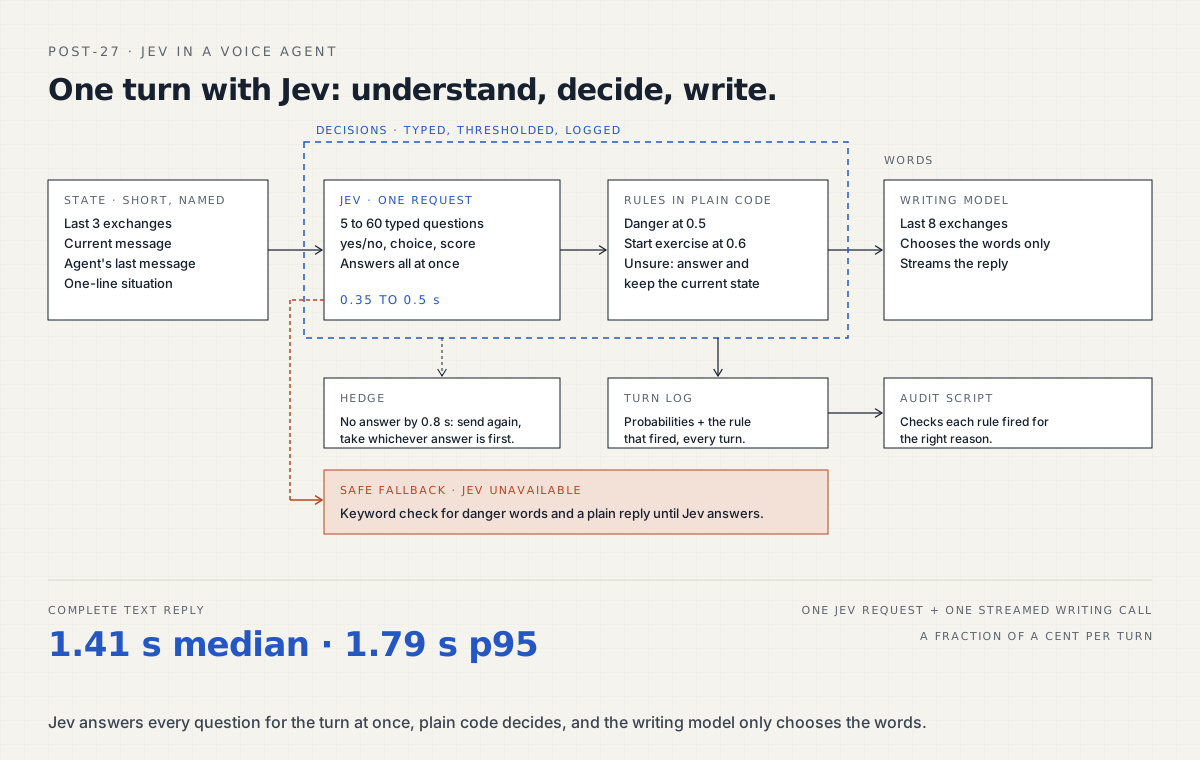
A voice agent does two jobs on every turn: it understands what the user said, and it writes what to say back. When the understanding follows a rulebook (which topic is this, did the user agree, is this step done, is there a safety risk), it pays to give each job its own tool.
We use a three-part turn on a voice coaching agent that guides users through structured exercises:
- Understand. Jev, a typed decision model from TypeSafe, answers typed questions about the turn: yes/no (a probability), choice (one option, with a probability for each), or score.
- Decide. Plain code applies the rules to those probabilities.
- Write. A writing model (an LLM) chooses the words.
Here are the ten Jev patterns that make it work, followed by a quick reference table.
What is Jev?
Jev is TypeSafe’s typed decision model, released in early access in September 2026. You send it a state (the relevant text) and a set of typed questions, and it returns a probability for each answer. It does not generate text. That makes it a natural fit for the “understand” step of a voice agent, where every answer needs to be a number your code can act on.
Asking Jev the right questions
1. Ask Jev everything in one request. Jev answers a whole set of questions against one state at once, and time barely grows with the number of questions: 0.35 to 0.5 s for anything from 5 to 60. So each turn sends one request with every question the turn might need: intent, safety screens, topic, “did they agree?”, “is this step done?”.
questions = {
    "risk_self": yes_no("Is the user describing a risk to their own safety?"),
    "agreed": yes_no("Did the user agree to the agent's last suggestion?"),
    "step_done": yes_no("Has the user completed the current exercise step?"),
    "intent": choice(["continue", "change_topic", "stop", "question"]),
}
answers = jev_decide(state, questions)  # one request, one round trip
2. Ask what this moment needs. Some questions carry more tokens than others. Picking a topic from a catalogue of dozens is most of a request’s size. Include it when a topic can change, and leave it out while an exercise is running.
3. Keep the state short and named. Short, labelled context gives the most accurate answers. Jev gets the last three exchanges, the current message, the agent’s last message and a one-line description of the situation. The writing model gets eight exchanges, because it needs tone and continuity.
state = {
    "situation": "Exercise 2, step 3 of 4. Agent asked for one example.",
    "recent_exchanges": last_exchanges(3),
    "agent_last_message": agent_last,
    "user_message": user_text,
}
4. Define both sides of every yes/no question. Tell the model what counts and what does not. A question about whether a specific hurtful event had happened scored 0.74 on “nothing actually happened, it’s just a feeling”. One added line made the boundary clear:
Does not count: a suspicion or a feeling with nothing that happened.Turning Jev probabilities into actions
5. Use fixed thresholds, set by the cost of being wrong. We act on safety risk at 0.5 and start an exercise at 0.6. Safety gets the lower threshold because a missed risk costs more than a false alarm. When unsure about anything else, the agent answers and keeps the current state, so the conversation keeps moving. This replaced an early design that gated every field at 0.9, where 7.6% of replies were the same clarification question.
6. Use the fan-out to skip repeat questions. Extra questions cost no extra time, so when an exercise might start we add one question per exercise: “has the user already answered this exercise’s first question?”. If they have, the agent moves straight to the next step instead of asking “what exactly happened?” again.
7. Store Jev’s probabilities with every turn. Each turn saves the signals behind its decision:
{
  "turn": 14,
  "signals": {"risk_self": 0.03, "agreed": 0.91, "step_done": 0.12},
  "rule_fired": "advance_on_agreement",
  "threshold": 0.6
}
A small audit script then checks that every rule fired for the right reason. This is how we verify a rulebook-driven agent turn by turn.
Running Jev in production
8. Hedge the Jev tail latency. If Jev has not answered in 0.8 s, send the same request again and use whichever answer arrives first. A turn costs a fraction of a cent, so the retry is cheap.
async def decide_hedged(state, questions, hedge_after=0.8):
    first = asyncio.create_task(jev_decide(state, questions))
    done, _ = await asyncio.wait({first}, timeout=hedge_after)
    if done:
        return first.result()
    second = asyncio.create_task(jev_decide(state, questions))
    done, pending = await asyncio.wait(
        {first, second}, return_when=asyncio.FIRST_COMPLETED
    )
    for task in pending:
        task.cancel()
    return done.pop().result()
9. Make the fallback safe when Jev is unavailable. If Jev is unavailable, the turn runs a keyword check for danger words and gives a plain reply. It does not advance an exercise or give an all-clear until a real decision is available.
10. Use Jev for turn detection too. “Has the speaker finished their thought?” is a single yes/no question. We covered the full setup in semantic turn detection with Jev.
Jev quick reference
| Pattern | What we use |
|---|---|
| Requests per turn | 1, with every question the turn needs |
| Jev latency | 0.35 to 0.5 s for 5 to 60 questions |
| Jev context | last 3 exchanges, current message, agent’s last message, one-line situation |
| Writing model context | last 8 exchanges |
| Safety threshold | 0.5 |
| Start exercise threshold | 0.6 |
| When unsure | answer and keep the current state |
| Hedge | resend at 0.8 s, take the first answer |
| Fallback | keyword danger check and a plain reply |
| Logging | probabilities and the rule fired, every turn |
| Complete text reply | 1.41 s median, 1.79 s p95 |
Key takeaways
- Give understanding and writing separate tools: Jev for decisions, an LLM for words.
- One Jev request per turn can carry every question you need.
- Write down what does not count for every yes/no question.
- Set each threshold by the cost of being wrong.
- Log the probabilities, and audit them with code.
- Keep a safe, simple fallback for when the decision model is unavailable.
What this means if you are an IT services firm
Clients in sensitive or regulated areas want to know why an agent did what it did. With this design the answer is always available: a stored probability, a written threshold, and the rule that fired. Testing becomes a normal engineering task.
taritas builds conversational AI with engineering teams who are adding it to their products, and this Jev split is one of the first things we set up. If that would help your next client project, see how we work with partners.
Reading this because a client asked for voice AI? That is the conversation we are built for. What taritas does for partners.