How to test voice naturalness with AI judges: a repeatable blind A/B method
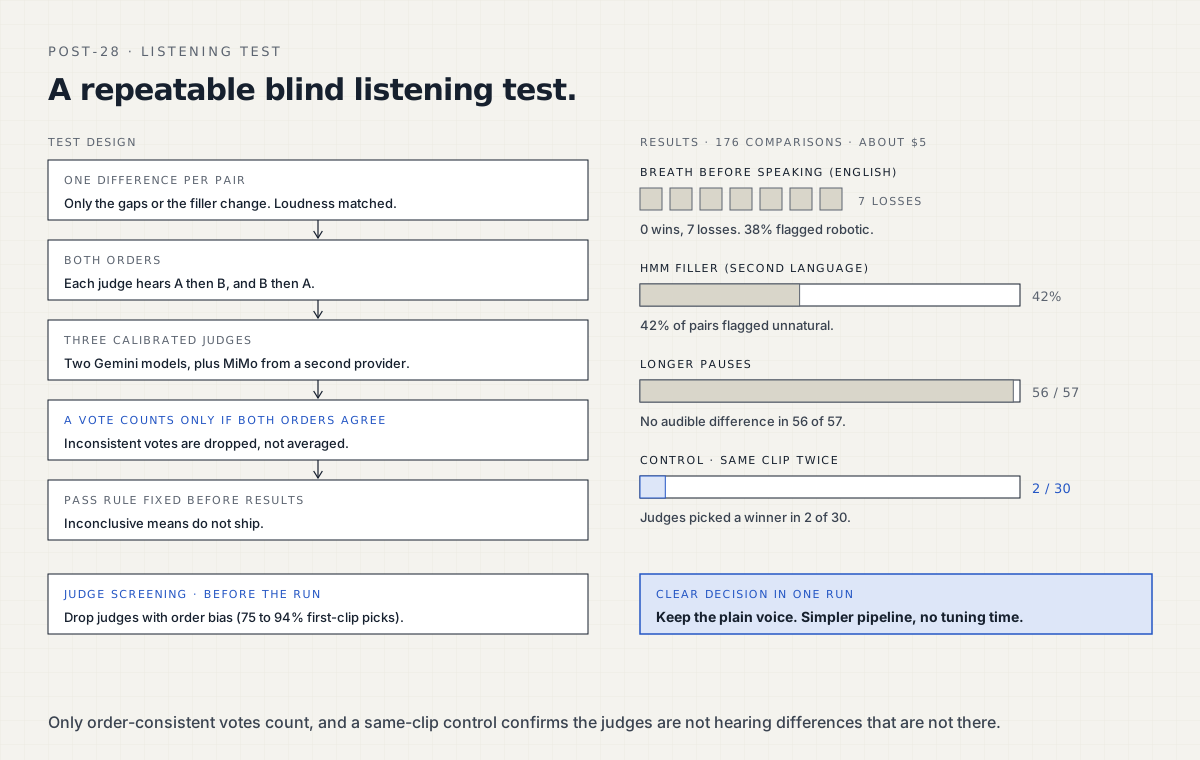
Compare two clips that differ in one thing, play each pair in both orders, and count a judge's vote only when both orders agree. Taritas runs this with a screened panel of three audio model judges and a same-clip control. One run of 176 comparisons cost about $5 and gave a clear, reliable decision on three voice features in two languages. Before trusting a judge, screen it on pairs where you already know the answer and drop any model with order bias: some picked the first clip 75 to 94% of the time. Match loudness, trim silence, and write the pass rule before the run, with inconclusive meaning do not ship. Decide on order-consistent wins and losses, not on 1-to-5 naturalness scores. In our run the judges picked a winner in only 2 of 30 control pairs, and the plain voice sounded as good as or better than breaths, fillers and longer pauses.
Published · Updated · Supreet Tare
All names, numbers, and identifiers in this post are anonymized. The patterns are real.
Voice quality is hard to measure, and it is harder still in a language your team does not speak. We needed to decide whether three small touches would make a bilingual voice agent sound more human: a soft “Hmm…” before some replies, slightly longer pauses between sentences, and a quiet breath before speaking.
So we built a blind listening test with audio-understanding models as judges. It cost about $5, took one run, and gave a clear answer. This post is the method, step by step, so you can reuse it. (The same agent handles its decisions and turn detection with Jev, covered in our guide to using Jev in a voice agent.)
Step 1: map what your TTS model can do
Start by measuring your text-to-speech (TTS) model’s real capabilities. TTS models accept tags in the text for effects such as a pause or a breath, and support varies by model.
What we found on ours:
| What we tested | Result |
|---|---|
| Pause tags | Worked |
| Written fillers (“Hmm…”) | Pronounced as written |
Breath tags like [inhales] on the fast model | Read aloud as the word “inhales” |
| Expressive model that supports breath tags | About 0.8 s to first audio, too slow for conversation |
That shaped the design: pause tags, written fillers, and breath clips recorded in each voice and inserted before the reply, all on the fast model.
Step 2: screen your judges
Before trusting a judge, test it on pairs where you already know the answer. We screened eight audio models this way.
- Order bias ruled some out. A few models picked whichever clip played first 75 to 94% of the time.
- The best panel had three judges: two Gemini models plus MiMo from a second provider. MiMo was the most disciplined judge and never reported a preference that was not there.
- The panel was strong on clear faults: a spelled-out “H M M”, a doubled word, rushed speech.
- Subtle differences need the full method in the next step, because that is where a single judge’s vote is least reliable.
Step 3: design each comparison
Play both orders. Each judge hears A then B, and B then A. The vote counts only if both orders pick the same clip.
def order_consistent_vote(judge, clip_a, clip_b):
    first = judge.compare(clip_a, clip_b)   # "first" or "second"
    second = judge.compare(clip_b, clip_a)
    if first == "first" and second == "second":
        return "A"
    if first == "second" and second == "first":
        return "B"
    return None  # inconsistent, so it does not count
Change one thing per pair. For pauses, the sentence audio is identical and only the gaps differ.
Match loudness and trim silence. Judges notice loudness quickly, and a louder clip once got tagged “sounds excited”. Normalize every clip first. For example, with ffmpeg:
ffmpeg -i clip.wav -af "silenceremove=start_periods=1:start_threshold=-50dB,loudnorm" clip_norm.wavInclude a control. Add pairs where both clips are the same sentence voiced twice. This tells you how often the judges hear a difference that is not there.
Write the pass rule before you run. Decide what counts as a win, and treat “inconclusive” as “do not ship”. Writing the rule first, called pre-registration, keeps the decision honest once the numbers arrive. A simple template:
feature: breath_before_reply
compare: with_breath vs plain
votes: order-consistent only
ship_if: feature wins a clear majority of consistent votes
inconclusive: do not ship
control_limit: judges pick a winner in under 10% of control pairs
Step 4: read the right numbers
Use order-consistent wins and losses. Skip the 1-to-5 naturalness scores: they ranged from 2 to 5 on the same clip, and written reasons sometimes changed between the two orders.
What the method told us
One run, 176 comparisons, about $5:
| Feature | Result | Decision |
|---|---|---|
| Breath before speaking | 0 wins, 7 losses in English. 38% of pairs flagged “robotic breath”. | Keep the plain voice |
| ”Hmm” filler, second language | Flagged unnatural in 42% of pairs (“sounds spelled out”). | Keep the plain voice |
| Longer pauses | No audible difference in 56 of 57 pairs. | Keep the default pacing |
| Control, same clip twice | Judges picked a winner in only 2 of 30 pairs. | Results confirmed |
The control row is what makes the rest trustworthy: the judges rarely invented a preference, so the other results reflect real differences. The decision was clear in one run: the plain voice sounded as good or better. That kept the pipeline simpler and saved the weeks we would otherwise have spent tuning breaths and fillers.
Listening test checklist
- Measure what your TTS model supports before designing features.
- Screen judges on known pairs, and drop any with order bias.
- Use a panel of at least two providers.
- One difference per pair.
- Loudness matched and silence trimmed.
- Every pair played in both orders.
- Control pairs included in every run.
- Pass rule written before the run, with “inconclusive” meaning “do not ship”.
- Decide on order-consistent votes, not on 1-to-5 scores.
- Remember that a transcript checks the words, not how they sound: speech-to-text heard every filler correctly.
What this means if you are an IT services firm
Clients often ask for a voice agent that “sounds more human”, sometimes in languages your team does not speak. This method turns that request into a measurable decision, in any language the judges support, for a few dollars per run.
Taritas uses this evaluation when building voice agents with engineering teams who are new to conversational AI. If you want that rigor on your next client project, see how we work with partners.
Reading this because a client asked for voice AI? That is the conversation we are built for. What taritas does for partners.