How Long Does It Take to Deploy a Voice AI Receptionist?
A production voice AI agent at taritas went dark 30 minutes into its live launch, and it was not a code defect: an admin-panel soft rate limit of 100 calls a day, generous enough during weeks of testing, hit real launch-day volume and silently rejected every call after that. The deploy itself took hours; the actual risk showed up in the first hours of production traffic, in a setting nobody re-audited against launch volume. That is the honest answer to how long deploying a voice AI receptionist takes: the code ships fast, but the first day in production is where configs, caps, and quotas meet real callers for the first time. Budget a full config audit and a staffed watch window for day one, not just a deployment slot, because every numeric limit in a system, panel caps, quotas, business-hours windows, is production policy whether or not it appears in a code review.
Published · Updated · Supreet Tare
All names, numbers, and identifiers in this post are anonymized. The patterns are real.
The symptoms
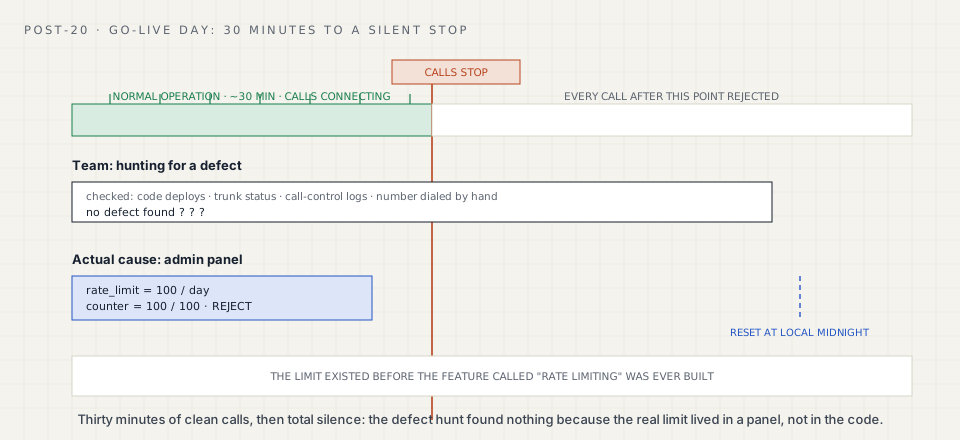
We run a voice AI agent that answers the inbound phone line of a public-sector service desk. Go-live day, after weeks of testing and a public demo on the same environment, the agent had been handling calls normally for about half an hour. Then inbound calls stopped connecting entirely.
Total silence on the line, on launch day, is the worst kind of failure to explain. The team started looking for a defect. There was not one to find. Nothing had shipped that day, the trunk provider’s status page was green, and the number worked fine when dialed by hand.
The architecture in 30 seconds
The agent’s platform gives operators an admin panel for the day-to-day settings a client changes without a deploy: business hours, transfer numbers, and a per-tenant daily call cap meant to bound cost and abuse. That cap is enforced in the request path by a single function, roughly:
def try_consume_call_slot(tenant_id: str) -> bool:
    """Atomic per-tenant daily counter, local-midnight rollover.
    Fail-open: if the check itself errors, the call proceeds."""
    try:
        return db.atomic_increment_if_under_cap(tenant_id)
    except DatabaseError:
        return True  # availability over enforcement
A separate, larger “Rate Limiting” feature, meant to give operators fine-grained per-hour and per-source limits, had been formally deferred to after the public demo. The team’s mental model going into launch was “we do not have rate limiting yet.” The soft cap in the admin panel was a different, older thing, and it had been sitting there through weeks of testing untouched.
Clue 1: a defect hunt that found nothing
Logs showed no errors, no exceptions, no failed deploys. The agent process was healthy. From the outside it looked like the phone system had simply stopped delivering calls, which pointed the investigation at the trunk and the telephony stack first, the two places least likely to fail silently and completely at once.
Clue 2: the limit that predated the feature
The correction came from checking panel state rather than code: the admin panel showed a daily call counter at 100 of 100, reset at local midnight. That cap had existed since before the “Rate Limiting” feature was ever scoped, sitting quietly through testing because 100 calls a day is generous for a QA environment and was never once hit. Launch-day volume hit it in about 30 minutes.
The confusing part is exactly why it took a while to find: the roadmap said rate limiting did not exist yet, so nobody was looking for a rate limit. But a cap already did exist, separate from the deferred feature, sitting in panel configuration rather than in a diff, a pull request, or a deploy log.
So what was the root cause?
A pre-existing admin-panel soft rate limit, 100 calls a day, hit real production launch volume. It was not a defect. It was working exactly as configured. Three things made it hard to see: the team had mentally filed rate limiting under “deferred, not built yet”; the limit lived in panel state rather than in code, so it never appeared in any review; and 100 a day never bound during testing, so it stayed invisible until it met real traffic.
How do you fix an admin-panel rate limit outage?
In this case, zero code. The operator raised the cap in the admin panel, and service recovered immediately with no deploy. The fix is trivial once found; the finding is the entire cost of the incident.
The lasting fix is process, not code: a tiered troubleshooting guide built the day after launch, so the next “calls stopped” report starts with a checklist of known soft limits before anyone goes looking for a defect. And a small code change to make the cap observable before it bites:
def try_consume_call_slot(tenant_id: str) -> bool:
    try:
        allowed, used, cap = db.atomic_increment_if_under_cap(tenant_id)
        if allowed and used / cap >= 0.8:
            alert(f"tenant {tenant_id} at {used}/{cap} daily calls")
        return allowed
    except DatabaseError:
        return True
Hardening beyond the hotfix
- Launch-day config audit: enumerate every limit, cap, or quota anywhere in the system, panel, environment variables, infrastructure quotas, and check each against expected launch volume. This cap would have failed that review in under a minute.
- Make soft limits observable. A cap that silently declines calls should page someone at 80 percent consumption, not surface as a mystery outage.
- Treat the fail-open design as correct in spirit but incomplete in practice: failing open on infrastructure errors is the right call, but failing hard-closed on the configured value means that value is your real availability policy. Alert on it accordingly.
- Two weeks later, the same deployment hit a second early-production outage from a different configuration default nobody had reviewed, a proxy timeout rather than a call cap. Two incidents, two different config layers, the same root pattern: early-production failures are mostly configs nobody owns.
Key takeaways
- The deploy is the easy part. The first days in production are where configuration meets real traffic for the first time.
- A limit that is not in your code or your infrastructure-as-code can still be a hard production constraint. Panel state is production state.
- Fail-open on infrastructure errors is a reasonable default. The configured limit itself is a policy decision and deserves its own alert, well before it is reached.
- “We do not have that feature yet” and “that setting cannot affect us” are different claims. Verify the second one against panel state, not the roadmap.
What this means if you are an IT services firm
If your clients are launching voice AI on a citizen-facing or customer-facing line, budget the first week as its own phase, not an afterthought to the deployment. Before any go-live, ask your team to list every numeric limit that exists anywhere in the system, panel, environment, infrastructure quota, and state which one gets hit first at ten times test volume. If that list takes more than an hour to produce, you do not yet control your launch. This is the kind of pre-launch audit we run behind IT services firms, under their brand.
Reading this because a client asked for voice AI? That is the conversation we are built for. What taritas does for partners.